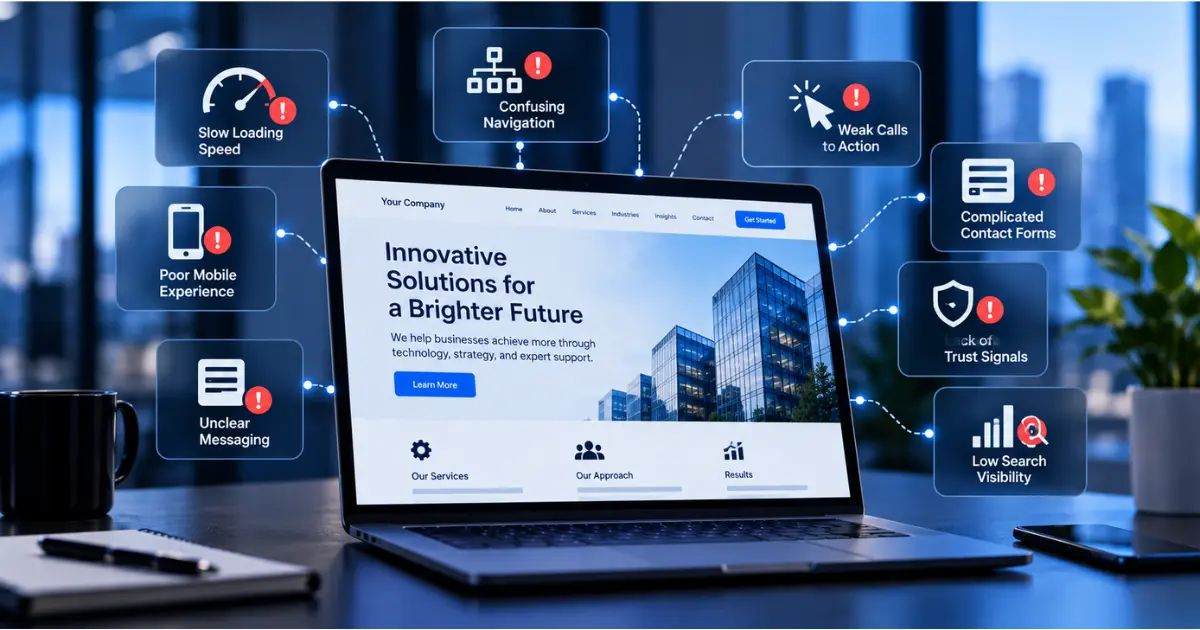
Your website is often one of the first places potential customers interact with your business. They may discover it through a search engine, a social media post, or a recommendation from someone they trust.
But attracting visitors is only part of the equation.
A website also needs to help people understand what your business offers, why they should consider working with you, and how they can take the next step.
If visitors struggle to find information, navigate your pages, or contact your team, you could be missing valuable business opportunities without realizing it.
The challenge is that these problems are not always obvious. A website can look modern and professional while still creating barriers that prevent visitors from becoming customers.
Here are some common signs that your business website may be holding back your growth.
1. Your Website Takes Too Long to Load
Website performance plays an important role in the user experience.
When visitors click on your website, they expect to access information without unnecessary delays. If pages take too long to load, some may leave before exploring your services.
Slow performance can result from oversized images, unnecessary scripts, inefficient code, or poorly optimized hosting.
It can also make navigating between pages frustrating, particularly for visitors using mobile devices or slower internet connections.
What you can do:
Start by testing your website using tools such as Google PageSpeed Insights. Review loading performance, identify technical issues, and prioritize improvements that affect important pages.
Compressing images, reducing unnecessary scripts, and improving how website resources are delivered can help create a smoother experience.
2. Your Website Doesn't Work Well on Mobile Devices
Potential customers may visit your website from smartphones, tablets, laptops, or desktop computers.
A website that looks good on a large screen may still be difficult to use on a phone.
Common mobile usability problems include text that is difficult to read, buttons placed too close together, navigation menus that are hard to operate, and page layouts that require excessive scrolling or horizontal movement.
These issues can make it harder for visitors to explore your services or complete an inquiry.
What you can do:
Review your website across different screen sizes, paying particular attention to navigation, text readability, forms, and calls to action.
Make sure visitors can easily access important information and complete essential tasks without needing to switch devices.
A responsive website should provide a consistent, accessible experience regardless of screen size.
3. Visitors Can't Quickly Understand What Your Business Does
When someone lands on your homepage, they should be able to understand your business within a short amount of time.
If your messaging is vague, overly technical, or filled with generic claims, visitors may struggle to determine whether your services are relevant to them.
For example, a headline such as "Delivering Innovative Solutions for Tomorrow" may sound professional, but it doesn't clearly explain what the company actually provides.
More specific messaging can help visitors identify your services and understand how your business addresses their needs.
What you can do:
Review the main headline and supporting content on your homepage.
Ask whether a first-time visitor can easily identify what you offer, who you serve, and the problems you help solve.
Use straightforward language and focus on the value your services provide rather than relying entirely on broad marketing statements.
Clear communication can help potential customers decide whether your business is the right fit.
4. Your Website Navigation Is Confusing
Visitors should not have to spend several minutes searching for basic information.
If your website has too many menu options, unclear page names, or an inconsistent structure, users may struggle to find what they need.
For example, someone interested in a specific service should be able to locate the relevant page without navigating through several unrelated sections.
Confusing navigation can also make it difficult for visitors to move naturally from learning about your business to contacting your team.
What you can do:
Organize your website around the information your audience is most likely to look for.
Keep navigation labels simple and descriptive. Make important service pages, company information, and contact options easy to access.
You should also review internal links to ensure visitors can move between related pages without unnecessary effort.
A well-organized website helps users find relevant information and understand the full range of services your business provides.
5. Your Calls to Action Are Missing or Unclear
A visitor may be interested in your services but still leave without contacting you.
One possible reason is that your website doesn't clearly explain what they should do next.
Calls to action (CTAs) help guide visitors toward relevant steps, such as requesting a consultation, contacting your team, or learning more about a service.
If these options are difficult to find or use vague language, visitors may not know how to proceed.
What you can do:
Include clear, relevant calls to action throughout your website.
For example, a service page could feature a button labeled "Talk to Our Team" or "Request a Consultation."
Make sure the action matches the information on the page and leads to the appropriate destination.
Avoid overwhelming visitors with too many competing options. Instead, prioritize the actions that make the most sense for each stage of their journey.
6. Your Contact Forms Are Too Complicated
A contact form is often the final step between a potential customer and a business inquiry.
If the form asks for too much information, contains unnecessary fields, or doesn't work properly, visitors may abandon it.
For example, someone requesting a basic consultation may not want to provide extensive company information before speaking with your team.
Technical issues can create additional problems. A form may appear to submit successfully without delivering the inquiry, or it may display confusing validation errors.
What you can do:
Keep forms focused on the information needed to respond to the inquiry.
Use clear field labels, make required fields obvious, and provide a confirmation message after successful submission.
Test forms regularly on both desktop and mobile devices. Verify that submissions reach the correct team members and that the process works as expected.
Small improvements to the inquiry process can make it easier for interested visitors to contact your business.
7. Your Website Doesn't Build Enough Trust
Before contacting a company, potential customers often want reassurance that the business is credible and capable of delivering its services.
A website with limited company information, no examples of previous work, or unclear service descriptions may leave visitors with unanswered questions.
Trust is particularly important for businesses offering professional or technical services, where customers may be making significant financial or operational decisions.
What you can do:
Include relevant information that helps visitors evaluate your business.
Depending on your industry, this may include client testimonials, case studies, professional credentials, team information, or examples of completed projects.
Make sure claims are accurate and supported by information you can verify.
You should also maintain consistent branding, professional content, and up-to-date contact information across your website.
The goal is to give visitors enough confidence to take the next step.
8. Potential Customers Can't Find Your Website Through Search
Even a well-designed website has limited value if the people looking for your services cannot discover it.
Search engine optimization (SEO) helps search engines understand your website and makes your content eligible to appear for relevant searches.
If your website has poorly structured pages, missing information, technical indexing problems, or content that doesn't address customer needs, it may struggle to attract relevant organic traffic.
For example, a company offering managed IT services may miss opportunities if its website doesn't clearly explain those services or address the questions potential customers are searching for.
What you can do:
Review your website's content and technical SEO fundamentals.
Ensure that important pages have descriptive titles, clear headings, useful information, and appropriate internal links.
Use Google Search Console to understand how your website appears in search results and identify potential indexing issues.
Focus on creating content that genuinely answers customer questions rather than adding keywords without context.
Improving search visibility is an ongoing process, but it can help more relevant visitors discover your business.
How Can You Tell If Your Website Is Underperforming?
Not every website problem is immediately visible.
To understand whether your website is supporting your business goals, it helps to look beyond appearance and review how visitors interact with it.
Start by examining a few important areas.
Website Traffic
Review how many visitors your website receives and where they come from.
If traffic is consistently low, you may need to investigate search visibility, content, or other traffic sources.
Visitor Engagement
Look at which pages attract attention and where visitors tend to leave.
These patterns can help identify pages that may need clearer messaging, improved navigation, or more useful content.
Inquiries and Conversions
Track how many visitors complete important actions, such as submitting a contact form or requesting a consultation.
If your website receives relevant traffic but generates few inquiries, review the steps visitors must take before contacting your business.
Technical Performance
Use performance testing tools to identify loading issues, mobile usability problems, and other technical barriers.
Tools such as Google Analytics, Google Search Console, and PageSpeed Insights can provide useful information, but the results should be considered together rather than relying on a single metric.
Improving Your Website Starts With Understanding the Problem
If your website isn't generating the results you expect, rebuilding it from scratch may not always be necessary.
Sometimes, improving a few important areas can make the experience significantly better.
For example, clearer service messaging may help visitors understand your offerings, while a simplified contact form may make it easier to submit an inquiry.
Other situations may require broader changes to website structure, design, performance, or content.
The best starting point is to identify where visitors experience difficulties and prioritize improvements based on their potential business impact.
A website should be evaluated not only by how it looks, but also by how effectively it supports your customers and business objectives.
Final Thoughts
Your website should do more than establish an online presence. It should help potential customers discover your business, understand your services, and connect with your team.
Slow performance, poor mobile usability, unclear messaging, confusing navigation, and weak calls to action can all create unnecessary barriers.
By identifying these issues and making targeted improvements, businesses can create better digital experiences and support stronger lead generation.
At Orbitz Technology, we help businesses strengthen their digital presence through website design, development, optimization, and growth-focused digital solutions.
Our approach focuses on connecting effective design with usability, performance, and business objectives.
Is Your Website Helping Your Business Grow?
Explore how Orbitz Technology can help improve your website's performance, user experience, and ability to generate business opportunities.
KEEP EXPLORING
Explore more practical perspectives on technology, security, automation, and business growth.

Managed Services
Compare managed IT services with an in-house IT team to choose the support model that fits your business.

AI & Automation
See how practical AI automation can streamline everyday workflows, improve productivity, and support smarter operations.

Cybersecurity
Understand the most important cybersecurity risks facing small businesses and the practical steps that help reduce exposure.
LET’S CONNECT
Talk to Our Team